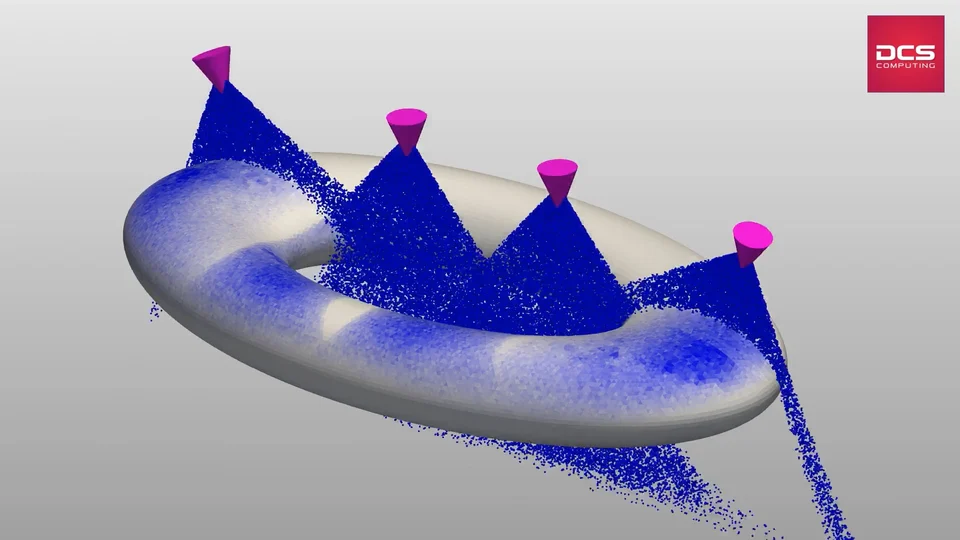
Lagrangian spray modeling is now accessible directly through the graphical user interface, streamlining setup and simulation of particle-laden flows. Usability has been further improved with the introduction of the custom_material_properties command, enabling more flexible material definitions. In addition, spray particle visualization is now supported in the Preview Window, allowing immediate inspection of simulation setups.
A new tutorial, Project_Lagrangian_Spray, is available to guide users through the setup and analysis of Lagrangian spray simulations.
The animation shows an example spray-mesh interaction: four moving nozzles eject Lagrangian spray particles that coat a meshed geometry.
New Group Definition Command
The newly introduced define_group command replaces the previous group functionality, offering greater flexibility and control. Key features include:
Dynamic group definitions based on user-defined conditions
Support for both accumulative and non-accumulative group types
Automated output generation to facilitate post-processing workflows
This enhancement enables more precise and efficient management of particle subsets during simulation, the example shows the grouping according to temperature.
Simplified Postprocessing
The Visualization tab has been expanded to offer greater flexibility and control over post-processing and result analysis. New capabilities include:
User-defined number of views for ParaView
Option to choose between system-defined ParaView settings and a standardized design layout
Static visualization of the entire simulation tree structure now supported in OVITO and ParaView
These enhancements simplify the configuration of visual outputs and improve accessibility of simulation data across tools.
More Basic Geometry Types Available in the GUI
New primitive wall types now available in GUI:
Disk
Finite plate
Finite cylinder
Generic shapes now available for
Insertion shapes
Spray nozzles
Massflow calculation shapes
Unified Documentation
The CFDEMcoupling documentation has been fully integrated into the Aspherix® documentation, providing a unified and more accessible reference for users.
Additionally, the installed documentation now omits restricted features from the table of contents, resulting in a cleaner layout and improved readability.
A new feature enables droplets to deposit liquid upon impact with a surface mesh. The deposited liquid is recorded using the liquidContent mesh property.